
PC Gaming Center & Gaming Café Management Software
Every PC on the floor timed, priced and billed the same way, whether the player paid up front, is on a package, or settles at the end — with food and drinks on the same ticket.
The problems this solves
What you get
PC Session Control
Start, pause, extend, transfer and stop sessions per machine, with exact minute billing and fixed-time bookings that end themselves.
Prepaid Hours & Packages
Sell hour bundles that deduct automatically, with the remaining balance visible to staff and to the customer.
Customer Accounts & Wallet
Members hold a balance, top it up at the counter or online, and spend it on time and food.
Bookings & Reservations
Reserve machines ahead of time and hold them, so tournaments and regular slots do not collide with walk-ins.
Café Billing on the Session
Orders attach to the machine and settle in the same invoice, routed to the right prep station.
Usage & Revenue Analytics
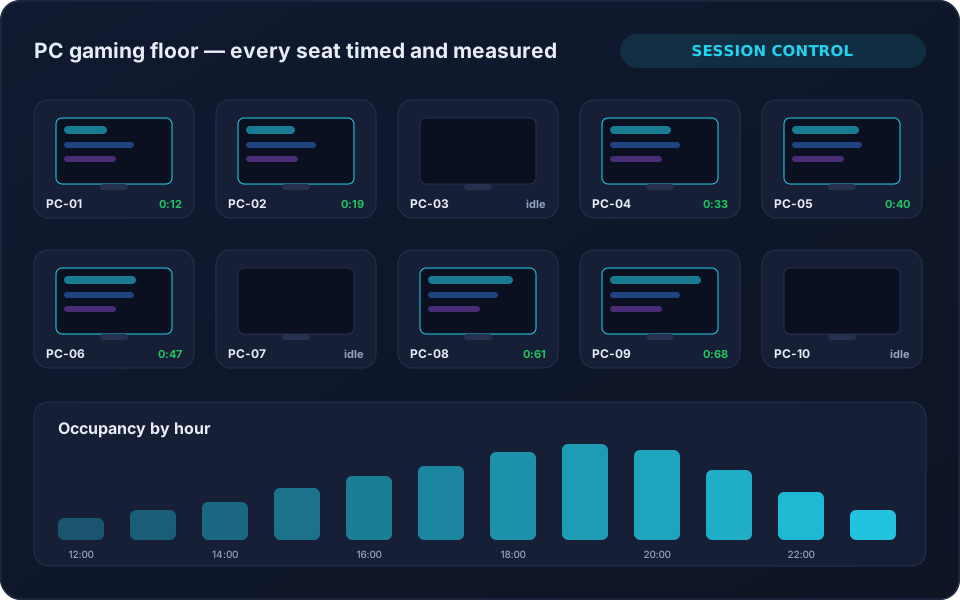
Occupancy by hour, revenue per machine, member versus walk-in mix, and branch comparison.
Session and time automation for gaming cafés
Gaming café management software has one job before all the others: know exactly how long each seat was used and charge for it consistently. 8BallPOS times every machine, shows the whole floor as live tiles, and settles the charge when the session stops. Fixed sessions carry a countdown so staff can see who is about to finish, and stop automatically when the paid time is used.
Where power or lighting switching is installed at the venue, ending a session can also drive the hardware command — the same relay control used for billiard tables.
Optional workstation integrations
8BallPOS handles the commercial side: who is playing, on which machine, for how long, on what rate, and what they owe. Deeper client-side control of the gaming PCs themselves — locking the desktop between sessions, imaging or deploying software — is integration work rather than a shipped feature. If you need it, tell us what you run and we will scope it honestly instead of promising it on a web page.
Why operators choose it
- Time is charged from the same rules for every customer and every cashier.
- Packages enforce themselves instead of relying on memory.
- One bill covering seat time and café spend.
- Peak-hour data that justifies the next hardware purchase.
- Multiple branches managed and compared from one place.
Frequently Asked Questions
Does 8BallPOS lock the PC between customers?
That is client-side control of the machine itself, which is integration work scoped per venue rather than a standard feature. The product handles session timing, pricing, billing and reporting for each machine out of the box.
Can customers pay in advance for hours?
Yes. Sell hour packages or prepaid sessions; time deducts automatically and you choose what happens when the balance reaches zero.
Can we run PCs, consoles and billiard tables on one system?
Yes — that is the normal case. All device types share customers, packages, wallets, café billing and reporting.
Does it work across multiple branches?
Yes. Each branch has its own devices, staff, pricing and reports, with tenant-wide reporting and branch comparison above them.
Ready to run your game center on autopilot?
See 8BallPOS live with your own venue in mind — free, usually 30 minutes. No public price list: we quote what your venue actually needs.